MediaSeal supports SAML-based authentication through an external identity provider (IdP). Follow these steps to configure the integration.
Before you begin
Ensure that you have:
- Administrator access to the MediaSeal server.
- Administrator access to your identity provider.
- Either the IdP's metadata URL or its metadata XML file.
- The name of the SAML attribute containing each user's email address.
Configure SAML in MediaSeal
Sign in to your MediaSeal server either via a web browser or via the MediaSeal App and open Settings.
Under Configure Identity Provider, select Add +.
Select the SAML tab.
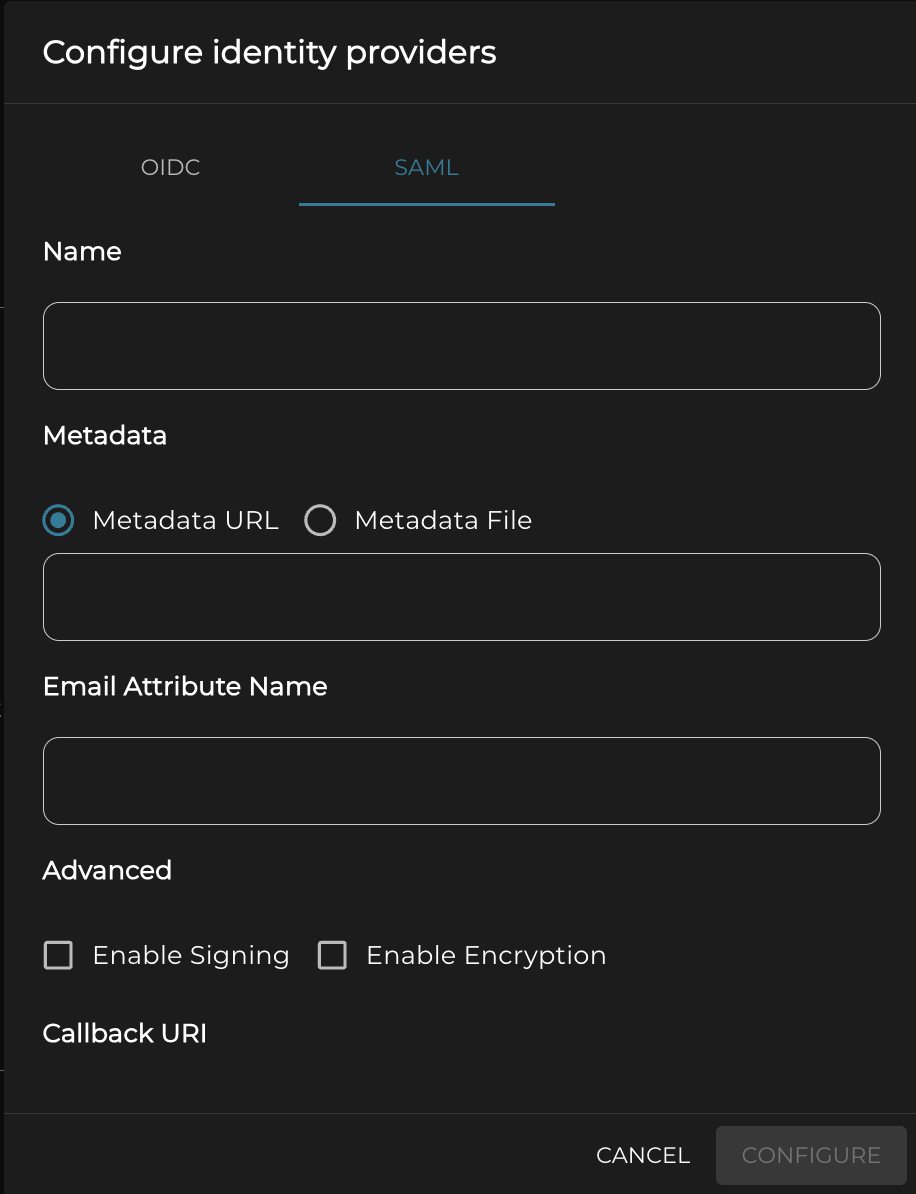
Enter a recognisable name for the identity provider in the Name field.
Under Metadata, select one of the following options:
- Metadata URL - enter the metadata URL supplied by your identity provider.
- Metadata File - upload the metadata XML file supplied by your identity provider.
In Email Attribute Name, enter the SAML attribute that contains the user's email address. This must match the attribute configured in your identity provider.
Under Advanced, configure either of these options if required by your identity provider:
- Enable Signing - enables digital signatures for the SAML exchange. Signatures help the systems verify that SAML messages are authentic and have not been altered. Enable this when required by your identity provider.
- Enable Encryption - enables encryption of SAML data, such as assertions, so that only the intended recipient can read it. Enable this when required by your identity provider, and make sure the required certificates are configured in both systems.
Under Callback URI, copy each URI displayed by MediaSeal and add it to the corresponding callback, reply, or Assertion Consumer Service configuration in your identity provider.
Complete the SAML application configuration in your identity provider. Make sure its email attribute and callback URIs match the values configured in MediaSeal.
Return to MediaSeal and select Configure to save the identity provider.
Verify the configuration
After saving the configuration:
Confirm that the new identity provider appears under Identity Providers.
Test authentication with a user whose email address exists in both MediaSeal and the identity provider.
Confirm that the identity provider returns the user's email address through the configured SAML attribute.
If authentication fails, check the metadata configuration, callback URIs, email attribute name, and signing or encryption requirements in both systems.